Setting up Anker SOLIX Home Power Panel
1. Connecting Anker SOLIX F3800 Portable Power Station
2. Turning On Anker SOLIX Home Power Panel
3. Initialize Anker SOLIX Home Power Panel with the Anker Power app
3.2 System Creation and Initialization
Turning Off, Resetting, or Disconnecting Anker SOLIX Home Power Panel
1. Turning Off Anker SOLIX Home Power Panel
2. Resetting Anker SOLIX Home Power Panel
3. Disconnecting Anker SOLIX F3800 Portable Power Station
Maintenance and Troubleshooting
1. Can I install Anker SOLIX Home Power Panel by myself?
2. How can I select the size of electrical wires for the system connection?
3. How to connect Anker SOLIX F3800 with Anker SOLIX Home Power Panel?
5. Does this system support solar panel connection?
6. Does Anker SOLIX Home Power Panel support 240V output?
7. Does the product support powering essential appliances during a blackout?
8. Can I manually switch between grid power and backup power?
9. How do I charge Anker SOLIX F3800 after connecting the system?
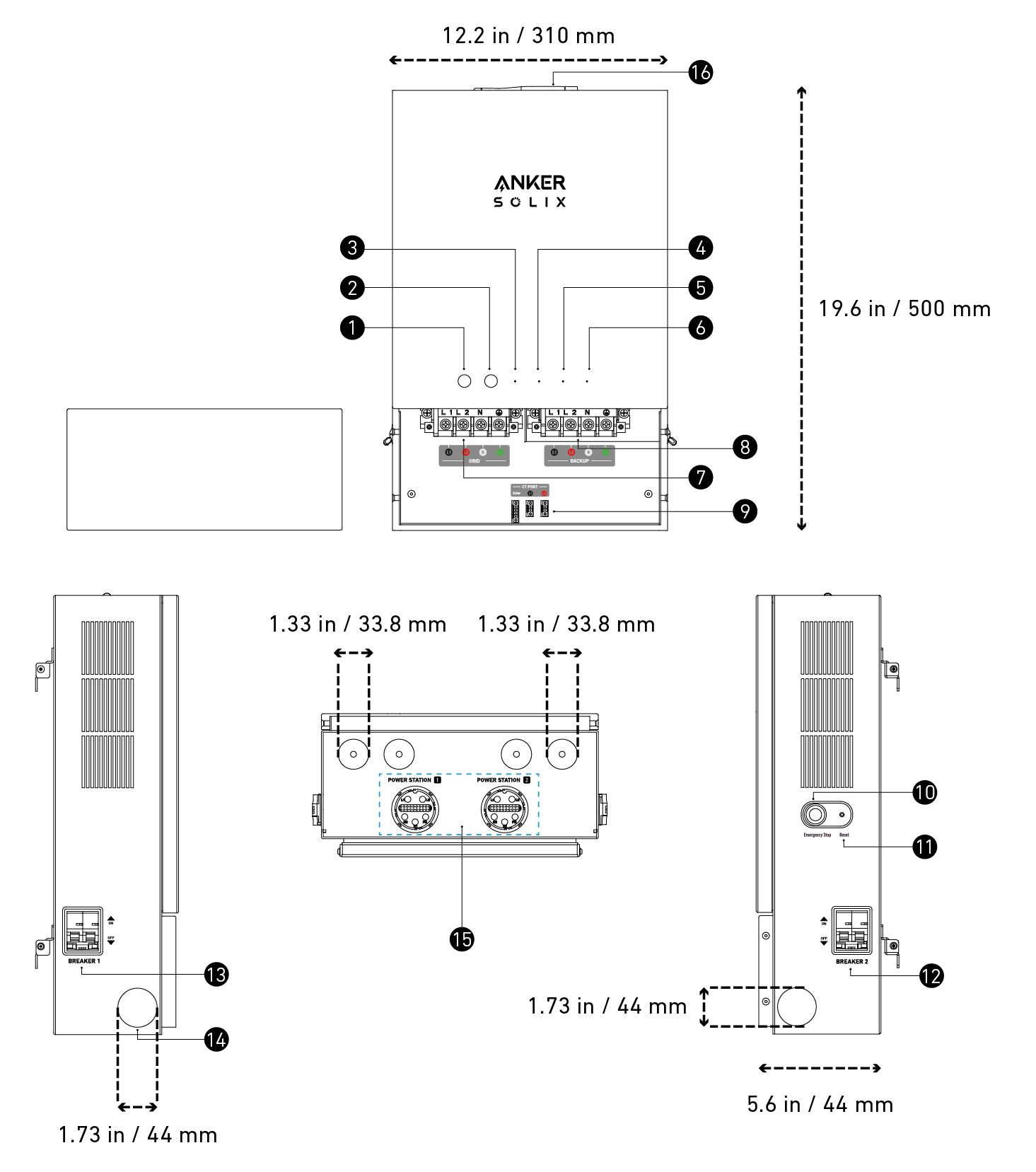

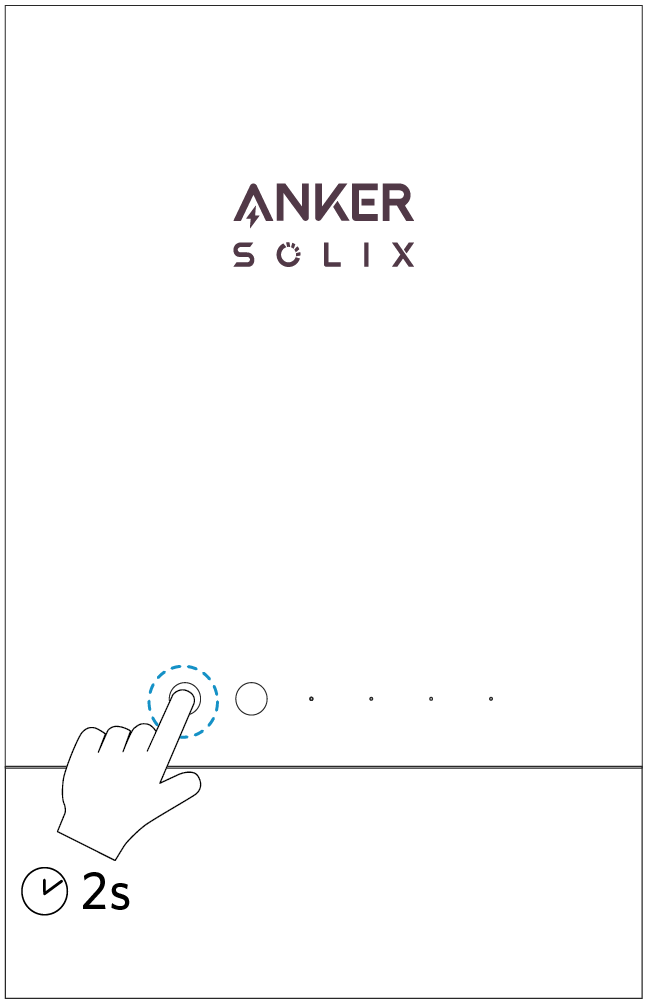
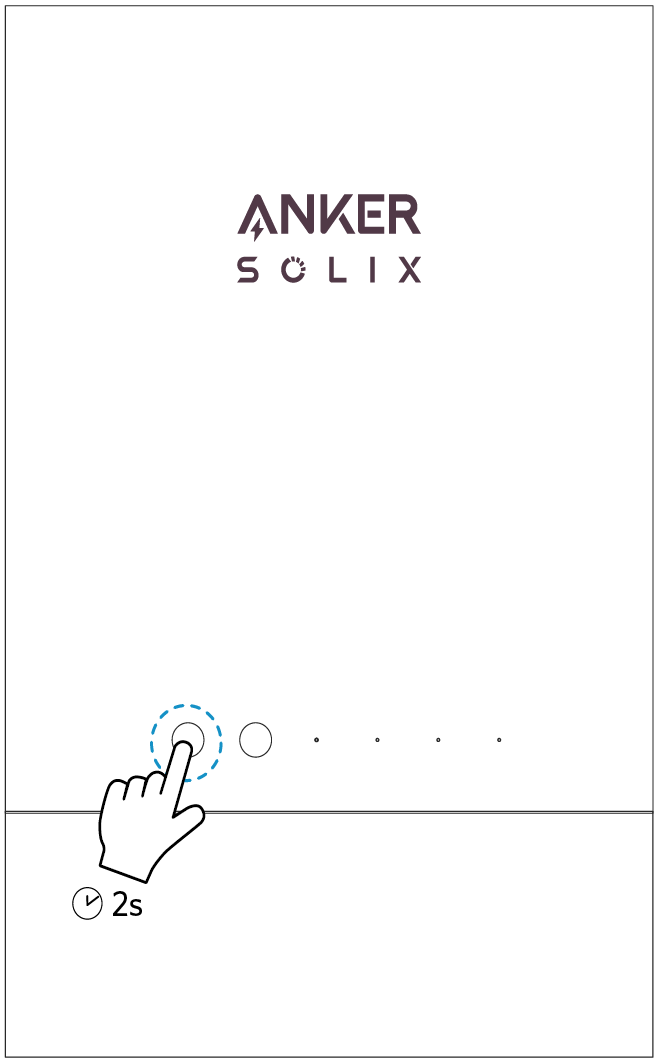
To Power On/Off: Press for 2 seconds.

This button can be used to turn on the Bluetooth hotspot.
 Grid Indicator


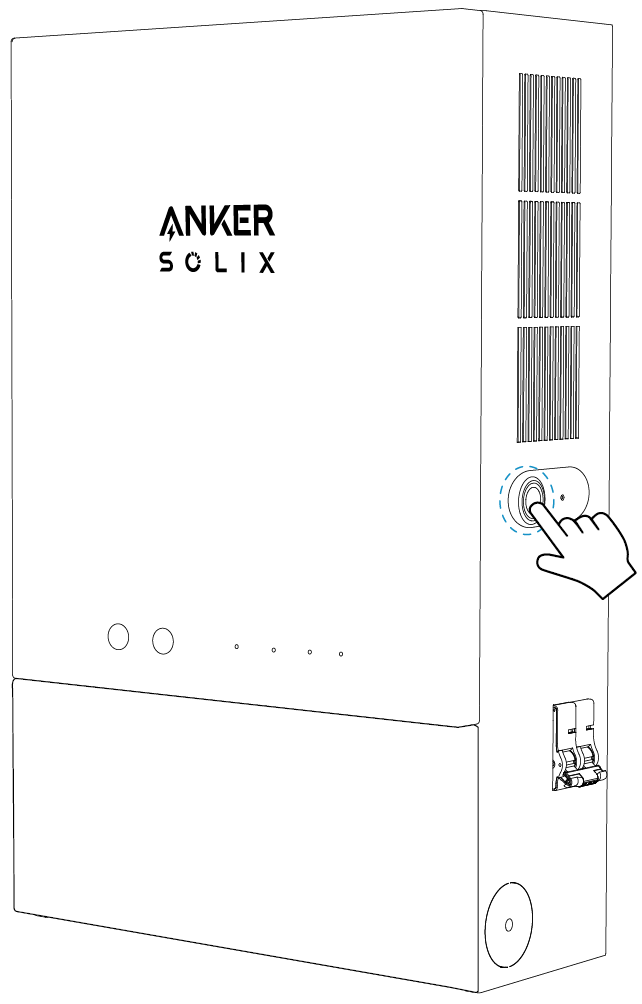
In case of emergency and product maintenance, this button can be manually turned on to cut off the power of the entire system immediately.

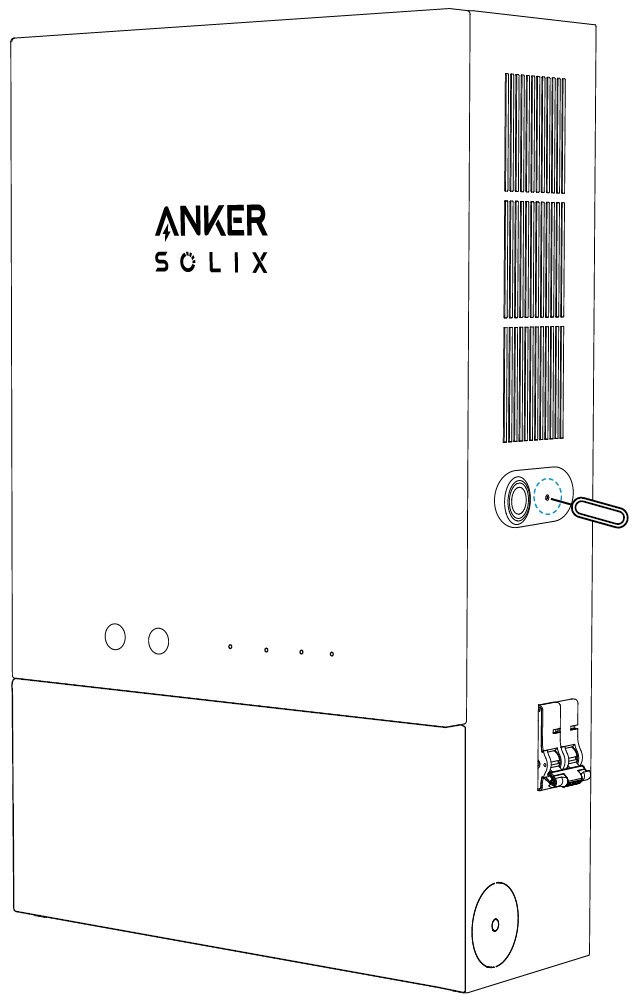
Inserting into this hole can reset the device to factory settings.

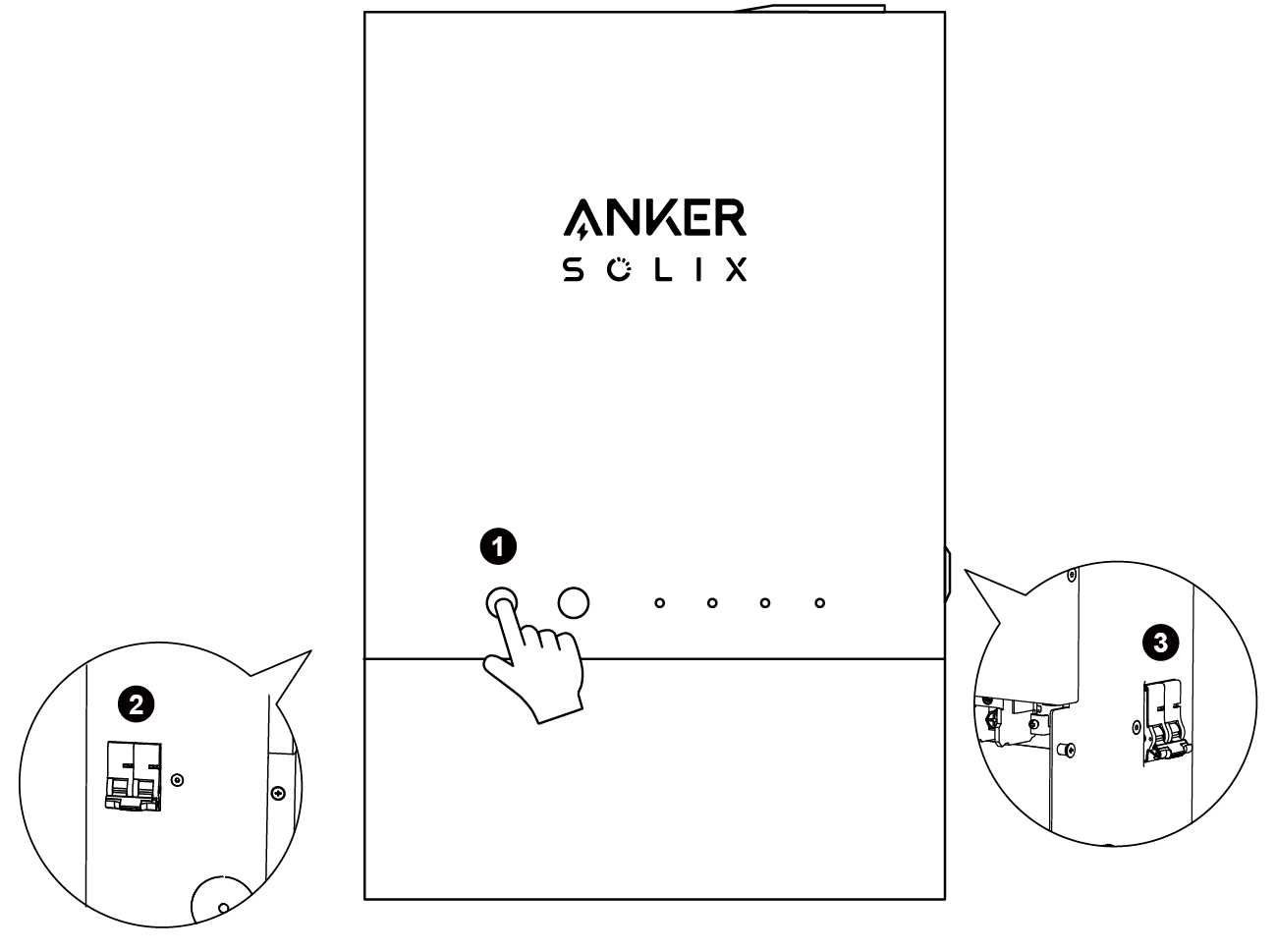
It can be manually or automatically turned on (under overload or short circuit conditions) to interrupt the current of Power Station 2, preventing further damage to the circuit.

It can be manually or automatically turned on (under overload or short circuit conditions) to interrupt the current of Power Station 1, preventing further damage to the circuit.

The diameter of the side wiring hole is 1.73 in / 44 mm.
The diameter of the bottom wiring hole is 1.33 in / 33.8 mm.

The ports can be used to connect the power station and the home power panel.
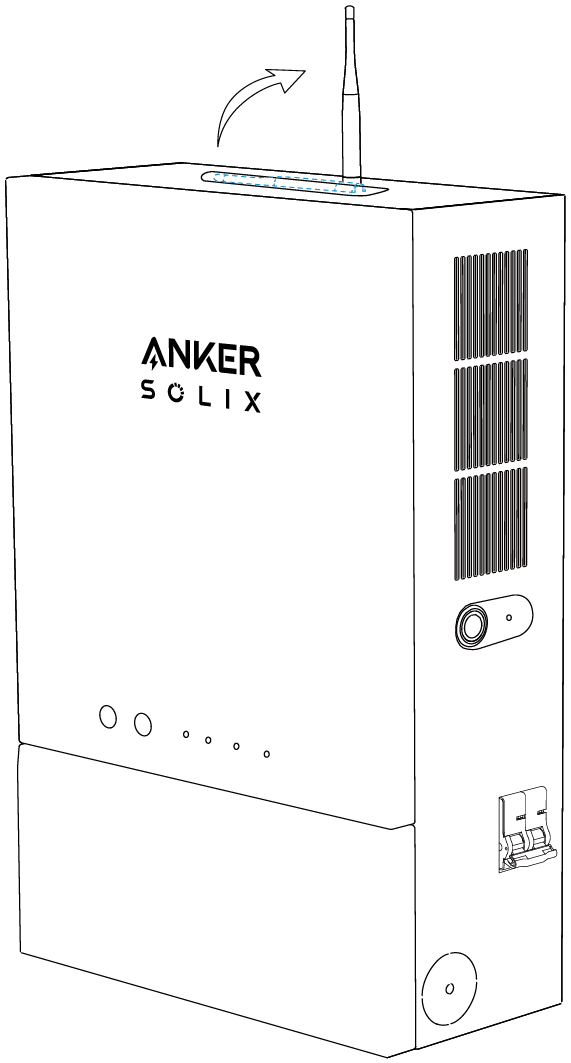
 Antenna
To ensure clear communication signals, please extend the antenna of Anker SOLIX Home Power Panel.

|
Indicator |
Status |
Description |
|
On/Off |
Steady White |
Operating Normally |
|
Flashing White Quickly |
Product Malfunction | |
|
Flashing White Slowly |
System Test Incomplete | |
|
Off |
Anker SOLIX Home Power Panel is Powered Off | |
|
|
Steady White |
Wi-Fi / Bluetooth Connection Successful |
|
Flashing White |
Pairing | |
|
Off |
| |
|
Grid Indicator |
Steady White |
Anker SOLIX Home Power Panel Powered from Grid |
|
Power Station 1 / 2 Indicators |
Steady White |
Power Station Connected with Anker SOLIX Home Power Panel |
|
Flashing White |
Device Connection Malfunction | |
|
Off |
Power Station Not Connected with Anker SOLIX Home Power Panel | |
|
Backup Load Indicator |
Steady White |
Anker SOLIX Home Power Panel is Supplying Power to Home Loads |

 Deactivated
Setting up Anker SOLIX Home Power Panel
1. Connecting Anker SOLIX F3800 Portable Power Station


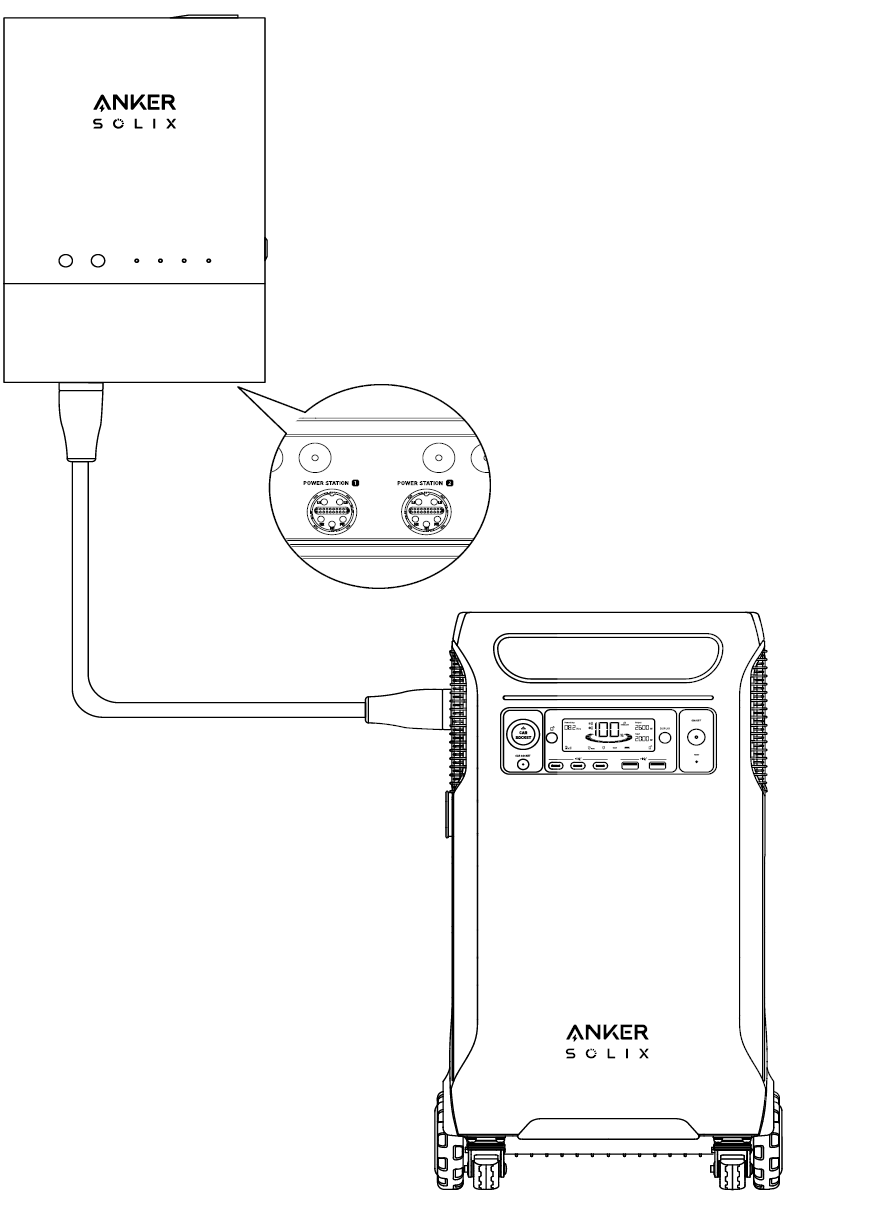
When connecting Anker SOLIX Home Power Panel and Anker SOLIX F3800 Portable Power Station , please strictly follow the following steps:
 Turn off the main switch of Home Power Panel and Anker SOLIX F3800.
 Connect Anker SOLIX F3800 Power Station to the bottom ports of Anker SOLIX Home Power Panel with the F3800 to Home Power Panel Cable.
*Anker SOLIX Home Power Panel can be connected with two F3800 at maximum.
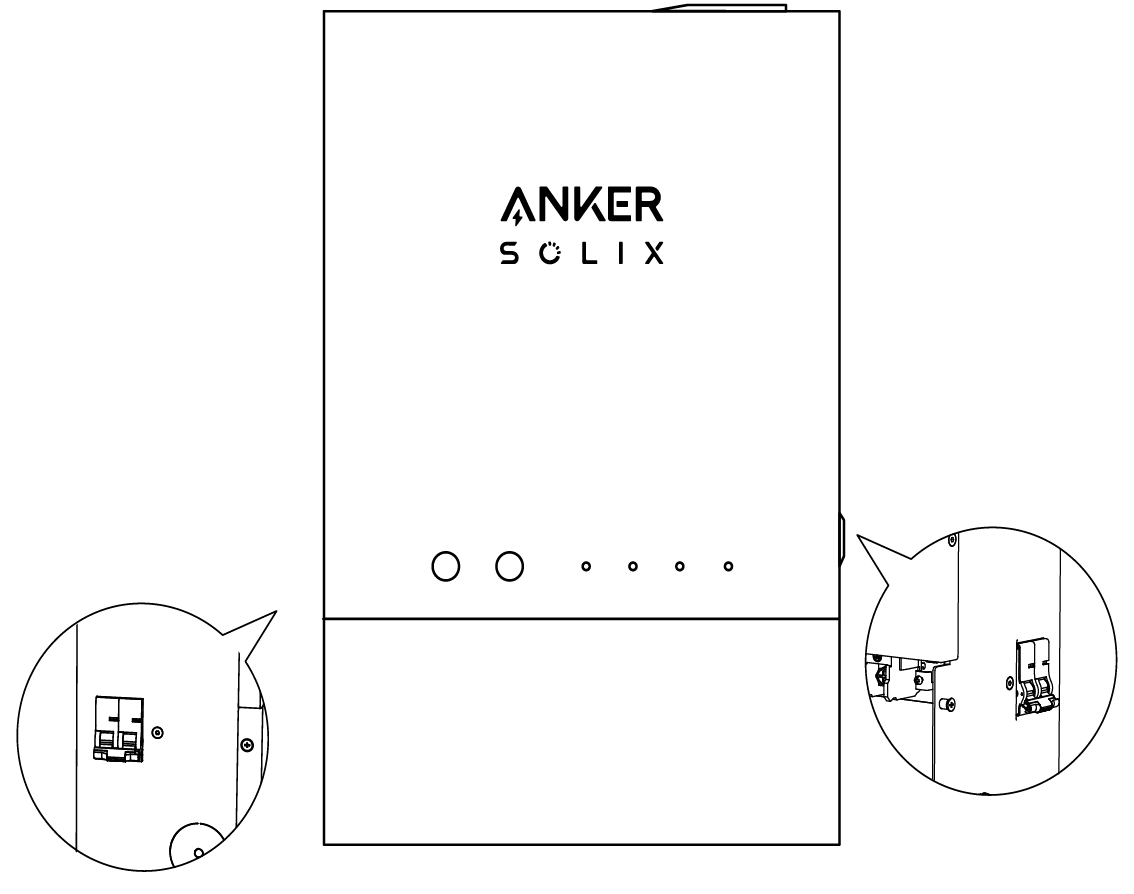
 Turn on either Breaker 1 or Breaker 2 on the side of Home Power Panel, depending on the connection of Anker SOLIX F3800. For two Anker SOLIX F3800 units, activate the breakers on both sides.
2. Turning On Anker SOLIX Home Power Panel

1. Check that the connection of the entire system has been completed.
2. Turn on the circuit breaker of the main panel and connect to utility power. Make sure the circuit breaker of the 12-Circuit Backup Load Center is also turned on.
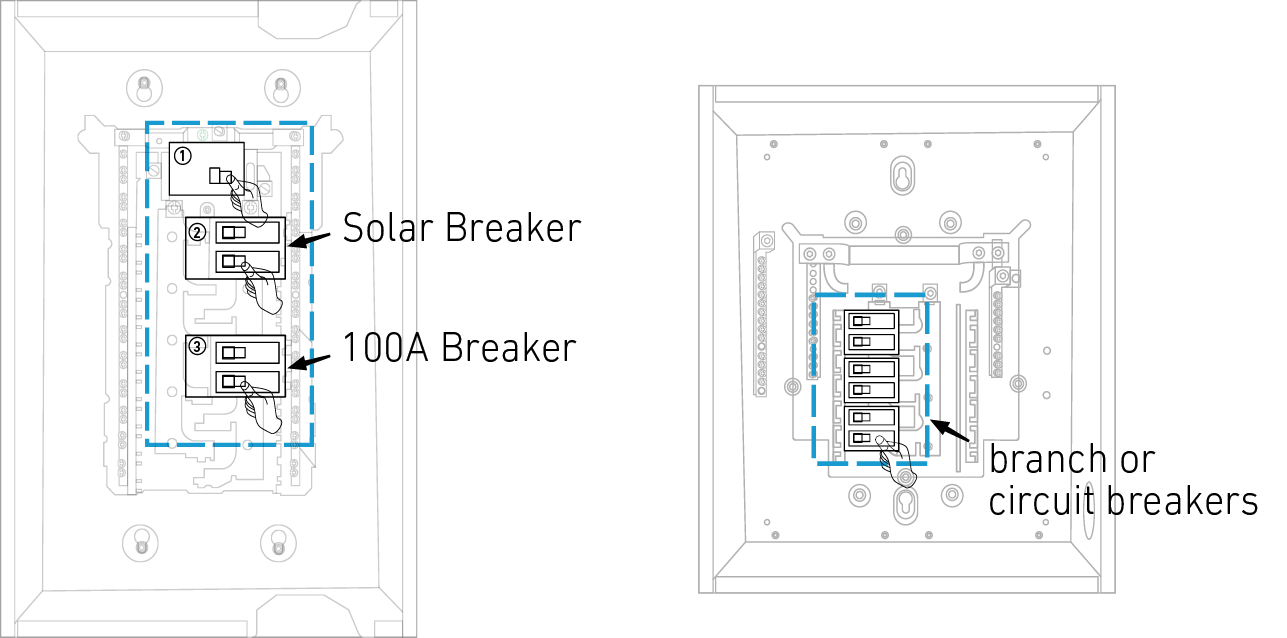
3. To ensure clear communication signals, please extend the antenna of Anker SOLIX Home Power Panel.
4. Press the On/Off button for 2 seconds to turn on Anker SOLIX Home Power Panel.
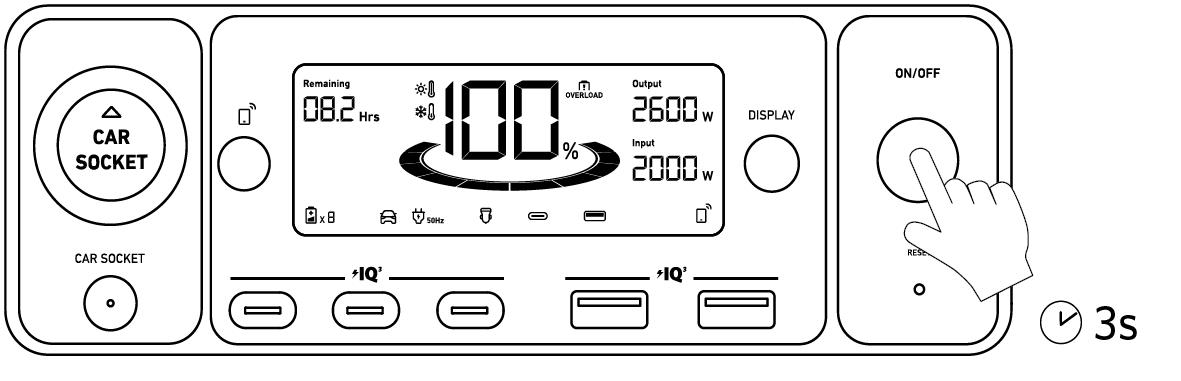
5. Press the On/Off button for 3 seconds to turn on Anker SOLIX F3800 Portable Power Station.
3. Initialize Anker SOLIX Home Power Panel with the Anker Power app
You can search "Anker" and download the app via the App Store or Google Play. Or scan the QR code below to go to your app store.

3.2 System Creation and Initialization
Press the  button on Anker SOLIX Home Power Panel. Start the Anker Power app and begin to initialize.
Add Anker SOLIX Home Power Panel in the "Devices" page. Follow the instructions to complete network setup.
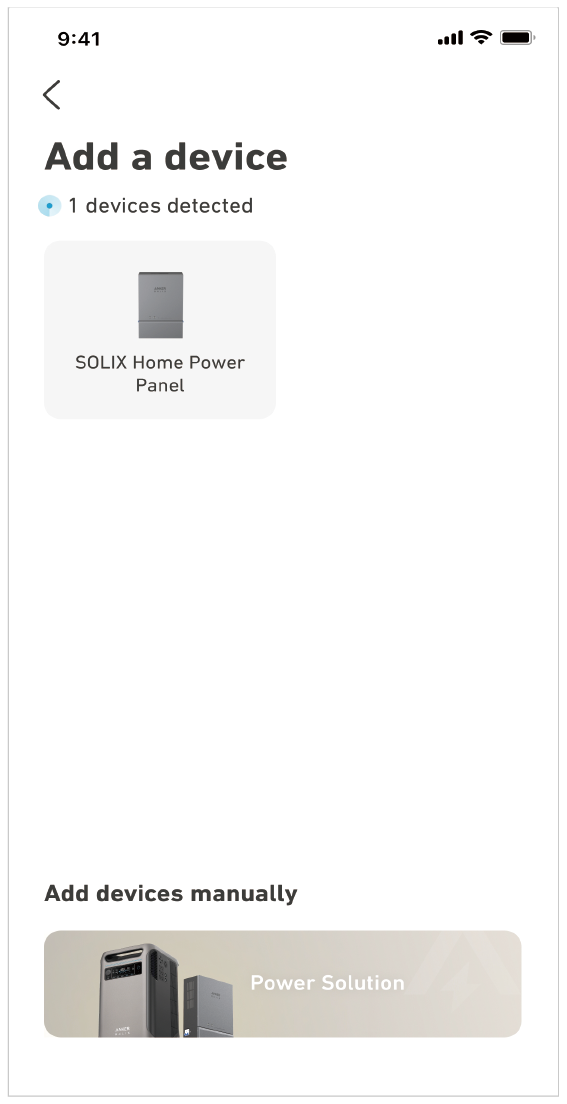
* You may need to update the firmware for both Anker SOLIX Home Power Panel and Anker SOLIX F3800 Portable Power Station during this procedure.
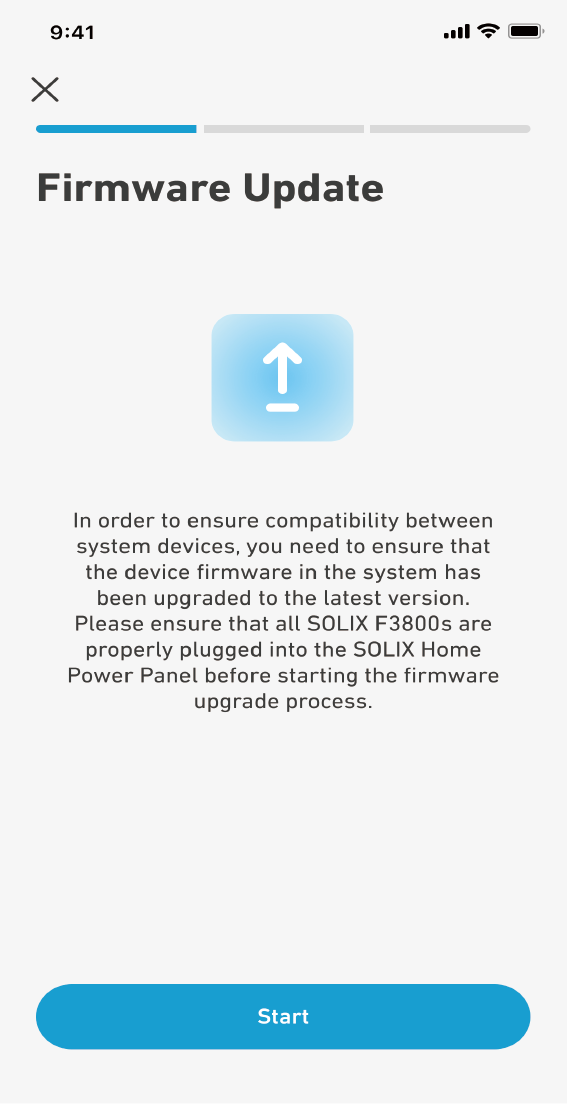
Once the network has been set up and the firmware has been updated, follow app instructions to complete the system test.
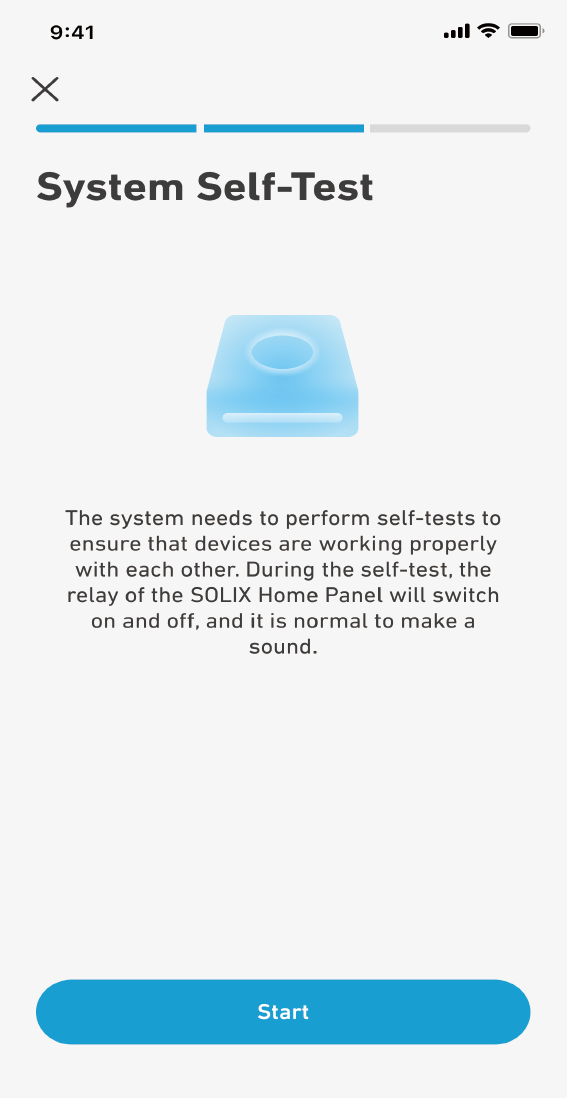
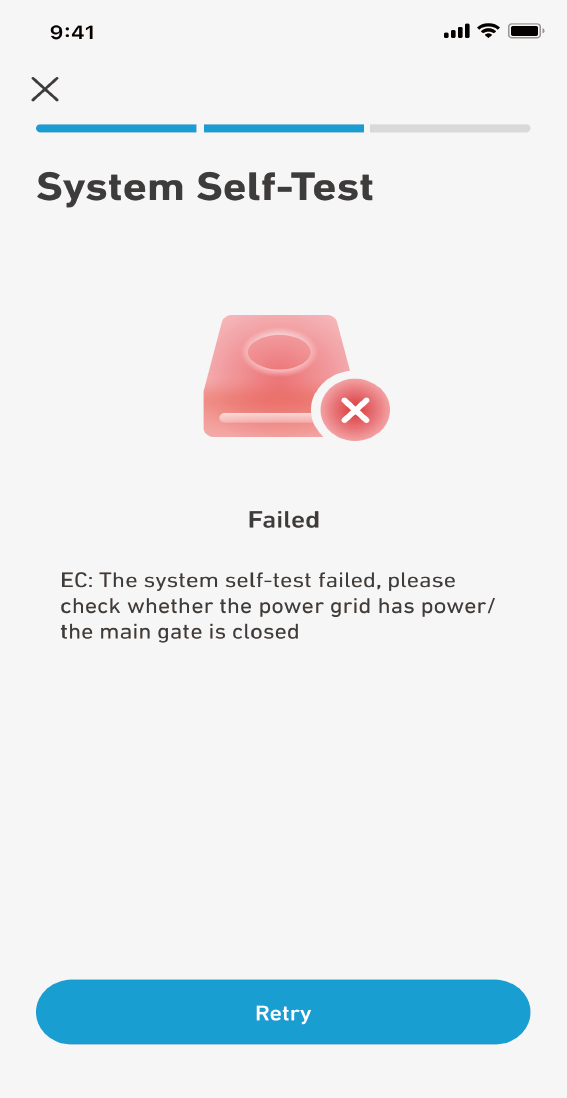
*If an error occurs during the system test, check the error message and follow the instructions to troubleshoot. Then, retry the system test again. Ask your electrician to assist if needed.
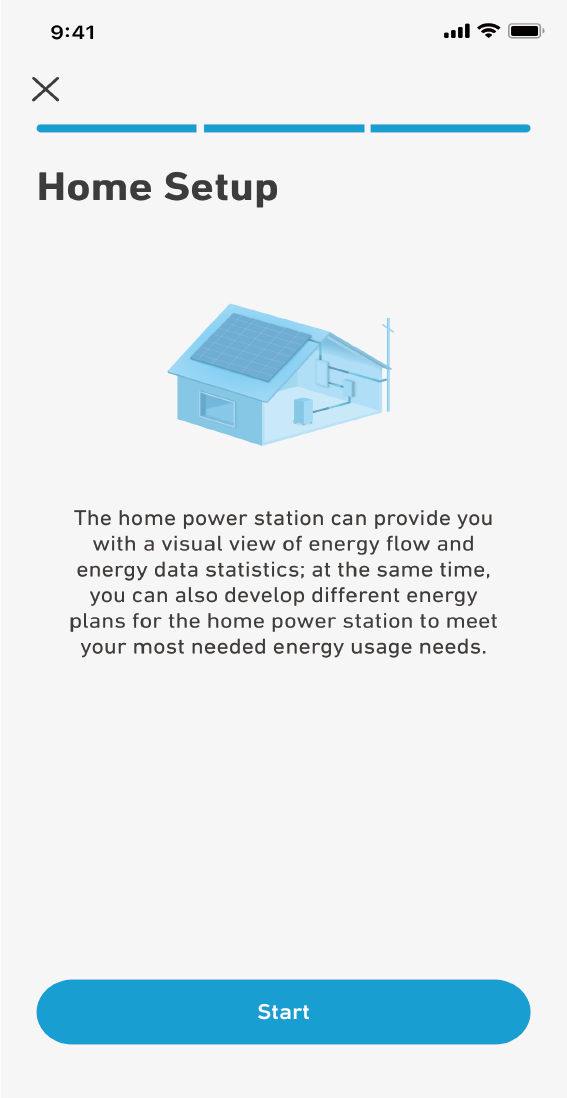
 After the system test, follow the instructions to set up your electricity settings. Once it is done, the system initialization is completed.
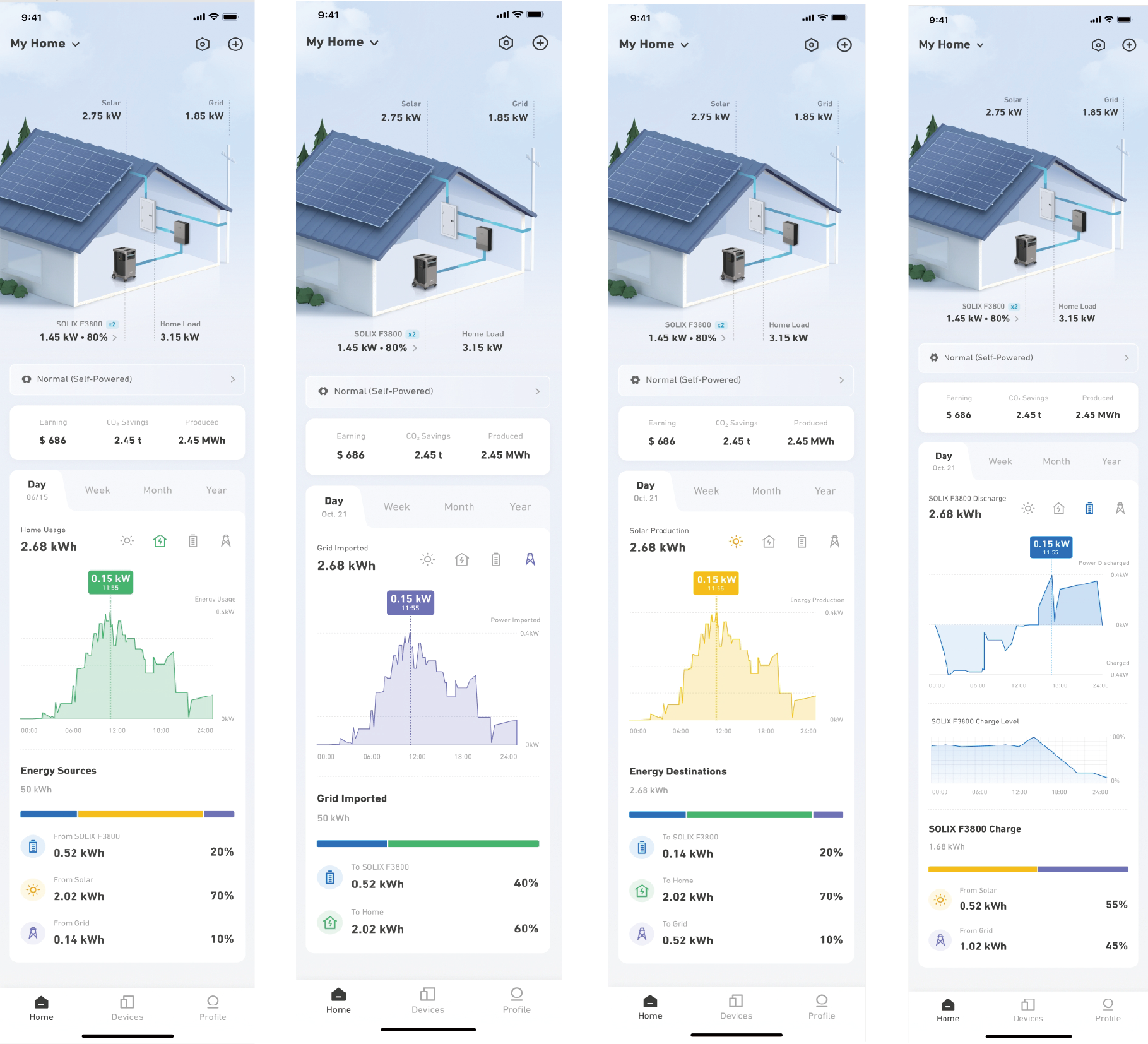
On the main page of the home system, you can view and manage the operating status and data performance of your household storage cycle system. Take note of the following features:
1.Real-time power values of devices within the system, displaying the energy flow through dynamic effects.
2.When configuring the electricity consumption plan for the home system, you can also view the current plan in use.
3.Power data that starts generating when you create the home system. This includes: photovoltaic revenue value, total carbon emissions and energy savings, and overall photovoltaic production.
4.Charts that show historical data trends in four areas: photovoltaic, household electricity, energy storage cycle, and grid electricity consumption, as well as statistics on the proportion of energy flow.
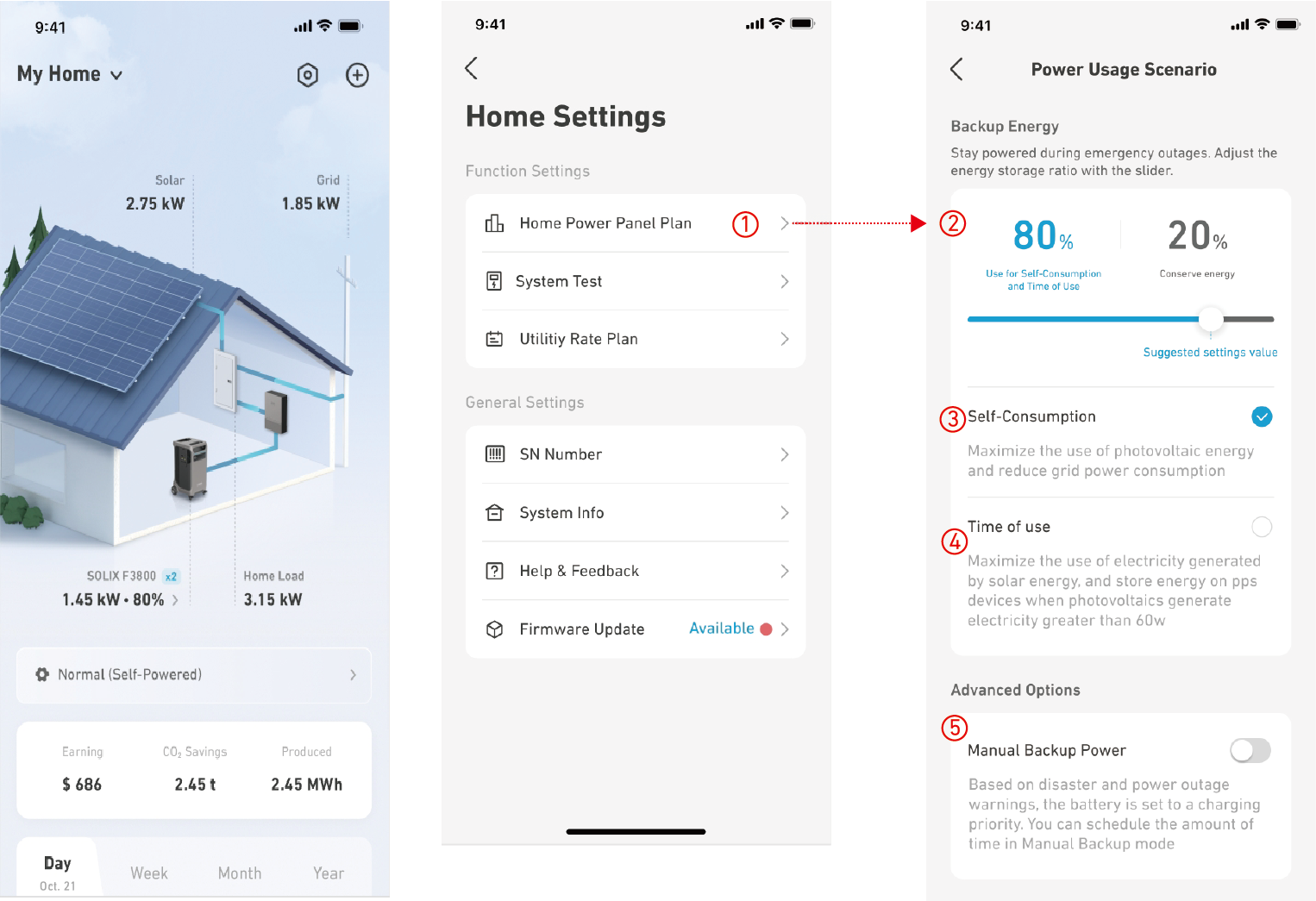
Tap [Home Power Panel Plan] on the main page, or  >[Home Power Panel Plan]:
1. Set the percentage of electricity that is currently connected to Anker SOLIX F3800 Portable Power Station to use in the electricity plan cycle. After setting, the reserved part of the electricity will not be used in the electricity plan cycle.
2. Self-Consumption mode: In this mode, solar power will be maximized to achieve the maximum self-consumption of PV power (Note: This mode requires your home to be connected to PV panels in order to operate normally).
•When PV power generation exceeds the household load demand, the excess power will be supplied to Anker SOLIX F3800 Portable Power Station for charging.
•When PV power generation does not meet the demand of household loads, Anker SOLIX F3800 Portable Power Station will replenish the required power until its own power reaches the set cyclic power value.
•When PV panels do not have surplus power to charge Anker SOLIX F3800 Portable Power Station, the power station discharges to reach the set cyclic power value, and then no longer discharges. If it is lower than the set value, it will use utility power to recharge to the set value.
3.Peak and Valley mode: Set the peaks and valleys of electricity prices for different time periods. The product then maximizes stored energy based on price, so you store power when prices are low and use power when prices are high:
•There are four states: Peak, Secondary Peak, Valley, Secondary Valley. You can set these values for different time periods, including weekdays, weekends, and seasons. The product will charge and discharge according to your instructions during the specified time period.
4.Disaster Preparedness mode: Implement emergency power storage and backup functions before a power outage occurs due to disaster.
•Stop all current power consumption plans.
•Set the amount of time in this mode and disaster preparedness reserve power.
•Within 12 hours from the start of the set time period, use photovoltaic and mains power for fast charging without changing the threshold of peak shaving and valley filling.
•Discharge power to your household within the set time period.
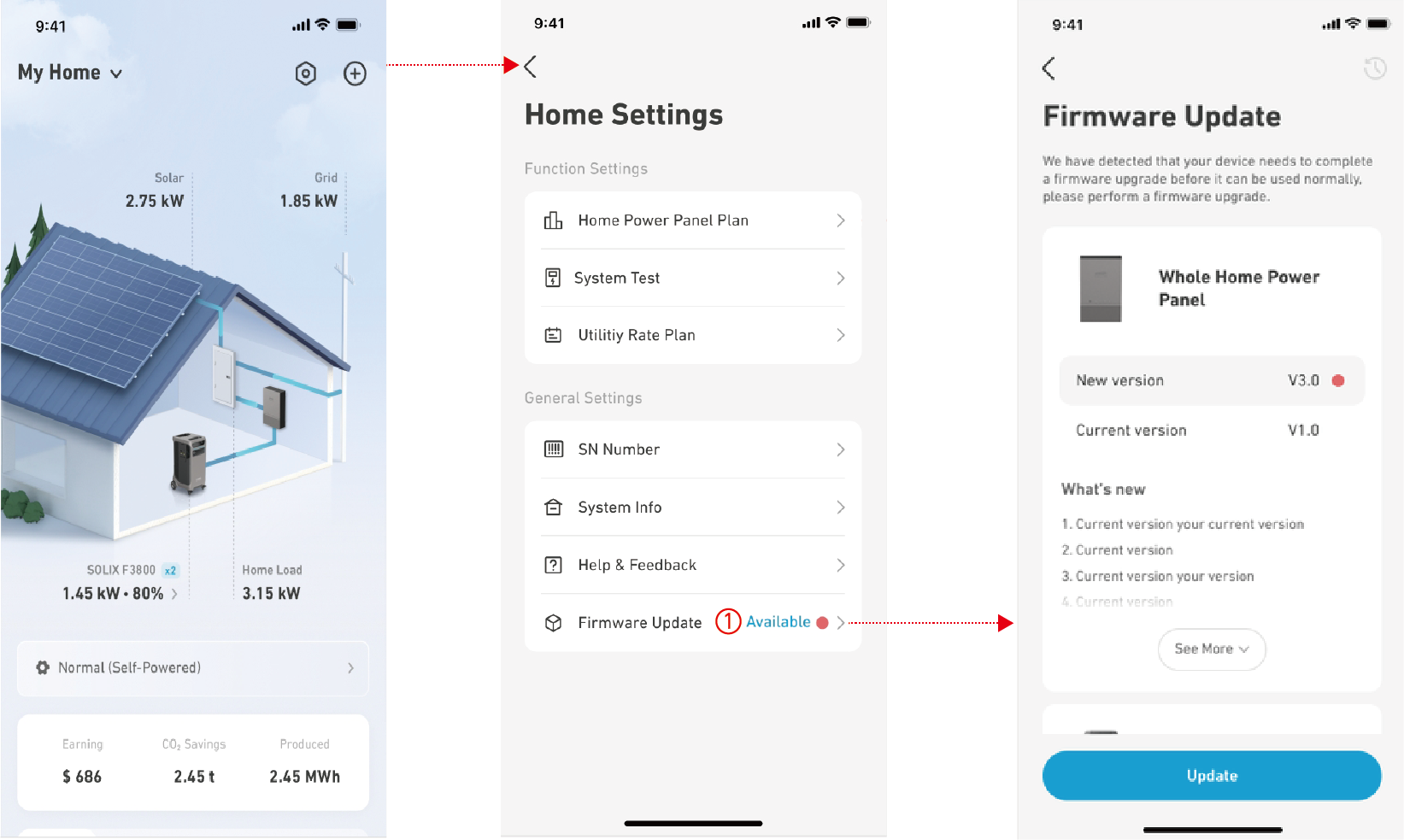
To ensure that the system can function properly, you need to regularly check for firmware updates:
1. Check for small red dots and the [Available] icon in the "Firmware Update" option. You can find this in "Settings" on the home system's main page.
2. If there is a firmware version that can be upgraded, click on [Firmware Update] to enter the interface, which will display all devices in the system that need an upgrade.
3. Click on [Update] to upgrade the firmware. During the upgrade process, ensure that:
•The device is powered on normally and Anker SOLIX F3800 Portable Power Station is not in a low battery state.
•There is a normal connection between devices.
•The device's Wi-Fi has a stable connection.
4. After completing the upgrade of Home Power Panel, the device will automatically restart to ensure it functions properly.
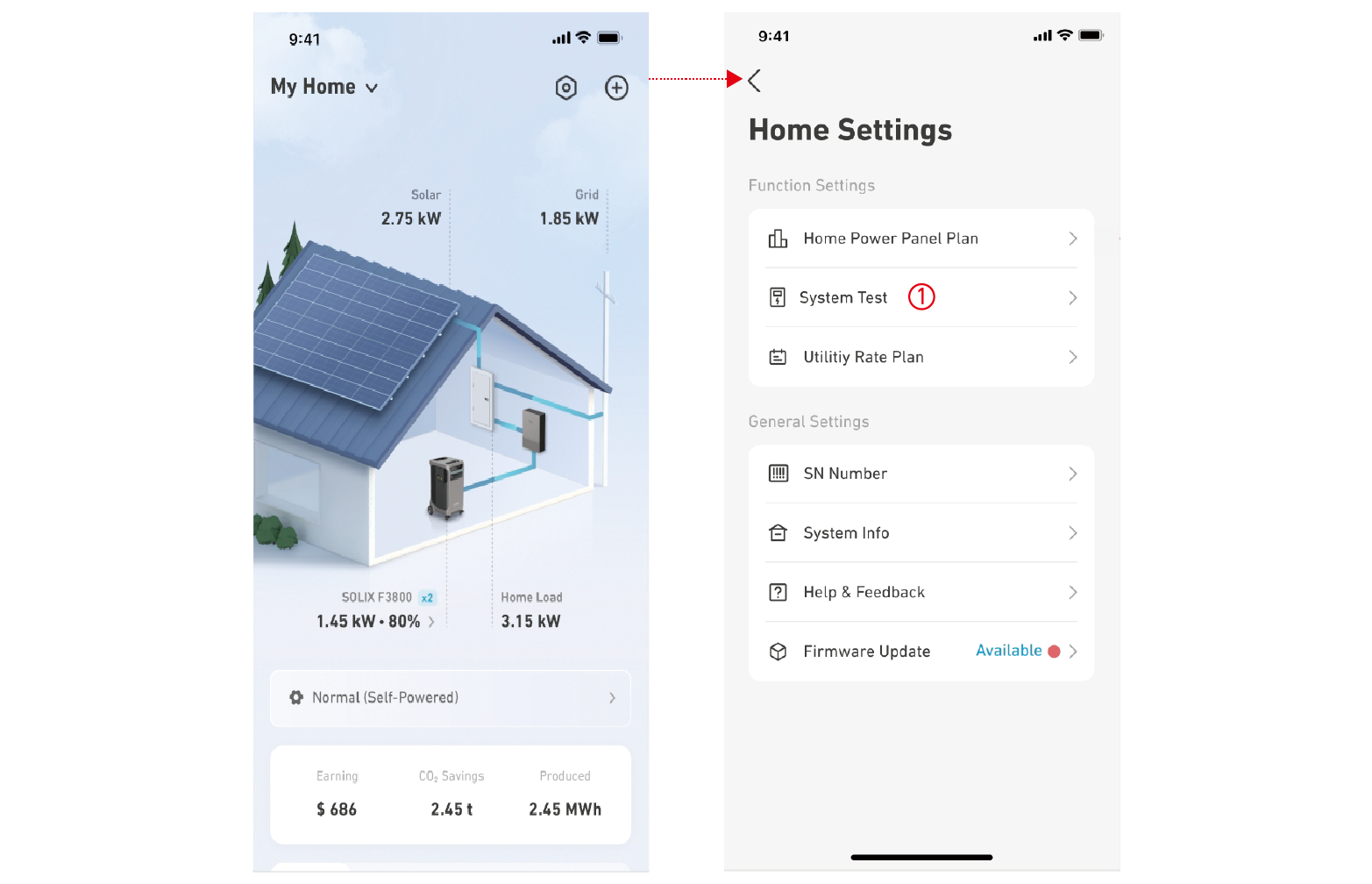
After making any adjustments to parts of the product, such as changing the connection method or configuration settings, you can perform a system test again via the app to ensure that the system is connected and working normally:
1. Go to the [Settings] entry on the Home page and click [System Test].
2. Follow the on-screen instructions to complete the system test. Please note:
•Before performing the system test, disconnect the circuit breaker on the PV side.
•Before performing the system test, ensure that Anker SOLIX F3800 Portable Power Station is connected and the power is in a normal state.
•If there is any abnormality in the system during the test, troubleshoot based on the error message.
Turning Off, Resetting, or Disconnecting Anker SOLIX Home Power Panel
1. Turning Off Anker SOLIX Home Power Panel
Press the On/Off button for 2 seconds to turn off the Home Power Panel.
2. Resetting Anker SOLIX Home Power Panel
If the Home Power Panel isn't working correctly, insert a paper clip or pin into the reset hole. If Home Power Panel still doesn't work, please contact support@anker.com.
3. Disconnecting Anker SOLIX F3800 Portable Power Station
Unplug the connection cable between Anker SOLIX Home Power Panel and Anker SOLIX F3800. Please strictly follow the following steps:
Turn off the main switch of Anker SOLIX Home Power Panel. Selectively turn off the Breaker 1 or Breaker 2 on the side of the Home Power Panel based on the connected Anker SOLIX F3800. Turn off the main power switch of Anker SOLIX F3800. Confirm that the above three steps have been completed before safely unplugging the connection cable.
In case of emergency and product maintenance, this button can be manually turned on to cut off the power of the entire system immediately.
Maintenance and Troubleshooting

|
Problems |
Solutions |
|
Wi-Fi cannot be connected or the connection is unsuccessful. |
•Ensure that the 2.4G network is in good condition (other devices have a stable connection). •Confirm that the selected area is correct (for email account registration area). •Press and hold the •If you still cannot connect to Wi-Fi, please connect to Bluetooth, upload the app log, and contact customer service personnel to provide the device serial number and email account. |
|
Anker SOLIX Home Power Panel upgrade failed. |
•Ensure that the 2.4G network is in good condition (other devices have a stable connection). •Try to upgrade again. •If the upgrade still fails, please connect to Wi-Fi, upload device logs and app logs, and contact customer service personnel to provide the device serial number and email account. |
|
System self-test failed. |
•Check the mobile app for pop-ups. •Troubleshoot based on pop-up messages. •Check if Anker SOLIX F3800 Portable Power Station is charging and discharging normally, and verify if there are any abnormal alarms such as over temperature, etc. •Ensure Anker SOLIX F3800 is securely connected to Anker SOLIX Home Power Panel (the indicator on Anker SOLIX F3800 should be steady) and that the cycle icon is displayed in the lower right of the screen. •Confirm that the battery level of Anker SOLIX F3800 Portable Power Station is below 95%. •Confirm that the main switch of Anker SOLIX Home Power Panel and the switch of Anker SOLIX F3800 Portable Power Station are turned on. •Verify that the Anker SOLIX Home Power Panel L1 and L2 CTs are securely installed (clamped to different phase wires). •Confirm that the mains voltage and frequency are within the normal range (L1 and L2 are between 90~132V, frequency is between 46~63Hz). •If all the above issues are confirmed to be normal and the system self-test is still not possible, please upload the device log and app log, and contact customer service to provide the device serial number and email account. |
|
Anker SOLIX F3800 Portable Power Station cannot be charged normally. |
•Confirm that Anker SOLIX F3800 Portable Power Station is connected normally (check if the indicator is on). •Confirm the main switch of Anker SOLIX Home Power Panel and the switch of Anker SOLIX F3800 Portable Power Station are turned on. •If two Anker SOLIX F3800 Portable Power Stations are connected, re-plug the connection cable between Anker SOLIX F3800 Portable Power Station and Anker SOLIX Home Power Panel. •Confirm the working mode set by the mobile app, set the RESERVE value, and the current time. •Please check for the following situations: 。If PV panels are connected and in Self-Generation or Self-Consumption modes, or if PV power is greater than load power, no charging will occur. 。f Super Valley and Disaster Preparedness modes are activated, there will be no charging. 。If neither of the situations above apply, you need to upload the device and app logs and contact customer service personnel to provide the device serial number and email account. |
|
Anker SOLIX F3800 Portable Power Station cannot discharge normally. |
•Confirm that Anker SOLIX F3800 Portable Power Station is connected normally (check if the indicator is on). •Confirm the main switch of Anker SOLIX Home Power Panel and the switch of Anker SOLIX F3800 Portable Power Station are turned on. •If two Anker SOLIX F3800 Portable Power Stations are connected, remove the connection cable between Anker SOLIX F3800 Portable Power Station and Anker SOLIX Home Power Panel and plug it back in. •Confirm the current mode set by the Anker Power app, set the RESERVE value, and the current time. •Please check for the following situations: 。If PV panels are connected and in Self-Generation or Self-Consumption modes, or if PV power is greater than load power, no charging will occur. 。If Super Valley and Disaster Preparedness modes are activated, there will be no charging. 。If neither of the situations above apply, you need to upload the device and app logs and contact customer service personnel to provide the device serial number and email account. |
|
The backup power port of Anker SOLIX Home Power Panel cannot load normally. |
•Confirm the customer's usage scenario, including current app mode, photovoltaic, and load conditions. •Verify the backup port can carry a load properly in Valley mode when utility power is available. •Confirm if Anker SOLIX F3800 can load normally in Off-Grid mode after disconnecting the mains power. •Check if there is an overload pop-up in the app. If one appears, wait 30 seconds, and press the On/Off button of Anker SOLIX Home Power Panel twice. •If the issue is still not resolved, record videos and upload system logs to the Research and Development team for analysis. |
 button for 7 seconds to clear the network configuration information, then reconnect to Bluetooth and configure the network
1. Can I install Anker SOLIX Home Power Panel by myself?
Anker SOLIX Home Power Panel must be installed by certified installers and electricians. Please send the installation guide to certified installers and electricians before the installation work.
2. How can I select the size of electrical wires for the system connection?
The size of wires depends on how much current passes the wires. Wire size references have been provided in the installation guide. Please check with your local electrician for specific wire gauges based on current requirements below.
|
Grid Side |
Backup Load Side | |
|
Single F3800 System |
50A / 12kW |
25A / 6kW |
|
Parallel F3800 System |
75A / 18kW |
50A / 12kW |
3. How to connect Anker SOLIX F3800 with Anker SOLIX Home Power Panel?
The bottom of Home Power Panel has two connection ports that can accommodate two Anker SOLIX F3800 units.
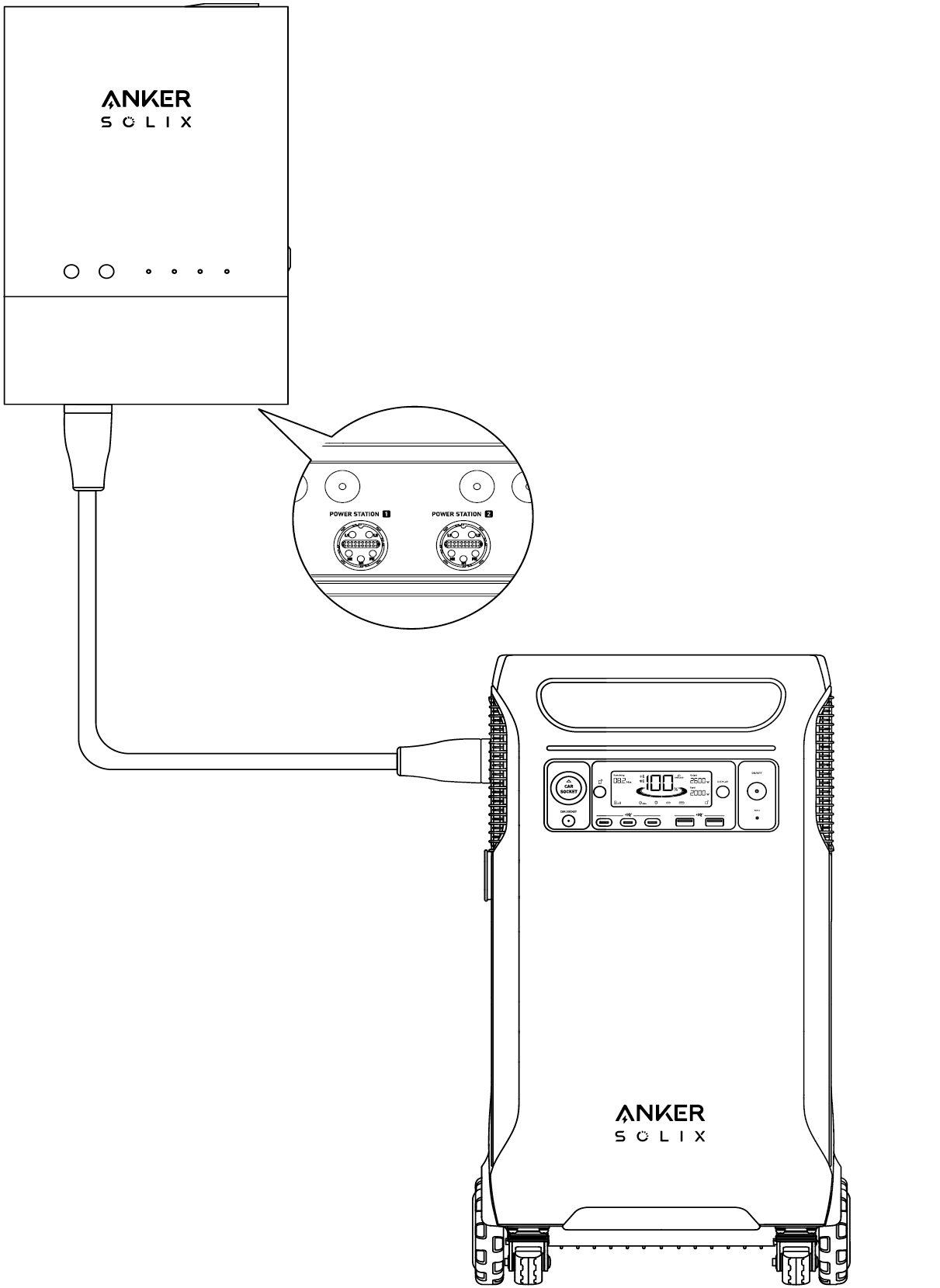
4. What's the maximum number of Anker SOLIX F3800 units and extra batteries that can be connected to Anker SOLIX Home Power Panel?
A maximum of two Anker SOLIX F3800 units and 12 extra batteries can be connected for a total of 12KW output power and 53.8kWh capacity. When Anker SOLIX Home Power Panel is connected to two Anker SOLIX F3800 Portable Power Stations, connect an equal number of expansion batteries to each Anker SOLIX F3800 Portable Power Station.
5. Does this system support solar panel connection?
Yes, Anker SOLIX F3800 can work together with the grid and rooftop solar system via Anker SOLIX Home Power Panel.
6. Does Anker SOLIX Home Power Panel support 240V output?
Yes, Anker SOLIX Home Power Panel supports 240V, and the backup wiring area can provide power output up to 12kW.
7. Does the product support powering essential appliances during a blackout?
Yes, Anker SOLIX F3800 will automatically power the backup loads via the Backup Load Center if a blackout occurs. The Backup Load Center included in the system can back up 12 circuits max.
8. Can I manually switch between grid power and backup power?
Yes, just use the Anker Power app.
9. How do I charge Anker SOLIX F3800 after connecting the system?
With Home Power Panel, Anker SOLIX F3800 can charge from rooftop solar panels or during off-peak hours. It will power your home during peak hours.
10. How does Anker SOLIX Home Power Panel operate with the main panel and 12-Circuit Backup Load Center?
Anker SOLIX Home Power Panel acts as a relay between the Backup Load Center and the external power grid. With Home Power Panel, Anker SOLIX F3800 can charge from rooftop solar panels or during off-peak hours. Anker SOLIX F3800 will power your home during peak hours. If a blackout occurs, Anker SOLIX F3800 automatically power backup loads via the Backup Load Center.
|
Model |
A17B1 |
|
Product Weight |
19 lbs / 8.8 kg |
|
Product Dimensions |
19.7×13×5.7 in 500×330.2×144.8 mm |
|
Installation |
Wall |
|
Warranty |
5 Years |
|
Rated System Voltage |
120 / 240V AC |
|
Grid Wiring Area (Input) |
18kW Max, 75A Max, 60Hz, L1+L2+N+PE |
|
Grid Wiring Area (Output) |
6kW Max (Continuous), 25A Max (Continuous), 60Hz, L1+L2+N+PE |
|
Overvoltage Protection of Grid Wiring Area |
Phase Voltage: •Overvoltage Point: 135 ± 3V •Duration: 200 ms •Recovery Point: 132 ± 3V •Recovery Time: 30 s Line Voltage: •Overvoltage Point: 270 ± 3V •Duration: 200 ms •Recovery Point: 265 ± 3V •Recovery Time: 30 s |
|
Undervoltage Protection of Grid Wiring Area |
Phase Voltage: •Overvoltage Point: 166 ± 3V •Duration: 200 ms •Recovery Point: 172 ± 3V •Recovery Time: 30 s Line Voltage: •Undervoltage Point: 83 ± 3V •Duration: 200 ms •Recovery Point: 86 ± 3V •Recovery Time: 30 s |
|
Backup Wiring Area (Output) |
12kW Max (Continuous), 50A Max (Continuous), 60Hz, L1+L2+N+PE |
|
Power Station 1 Ports (Input) |
6kW Max, 25A Max, 60Hz, L1+L2+N+PE |
|
Power Station 1 Ports (Output) |
3.8kW Max (Continuous), 15.8A Max (Continuous), 60Hz, L1+L2+N+PE |
|
Power Station 2 Ports (Input) |
6kW Max (Continuous), 25A Max (Continuous), 60Hz, L1+L2+N+PE |
|
Power Station 2 Ports (Output) |
3.8kW Max (Continuous), 15.8A Max (Continuous), 60Hz, L1+L2+N+PE |
|
Power Stations 1 and 2 Ports (Total Output) |
6kW Max (Continuous), 25A Max (Continuous), 60Hz, L1+L2+N+PE |
|
Power Stations 1 and 2 Ports (Total Input) |
12kW Max (Continuous), 50A Max (Continuous), 60Hz, L1+L2+N+PE |
|
Output Power Factor Rating |
One Anker SOLIX F3800, (30% Load) 1.9 W Load, PF > 0.96 Two Anker SOLIX F3800s, (60% Load) 3.8kW Load, PF > 0.98 Two Anker SOLIX F3800s, (100% Load) 6kW Load, PF > 0.985 |
|
Nominal Output Voltage (AC) |
120/240V |
|
Normal Output Frequency |
60Hz |
|
Normal Temperature Range Operation |
-4°F - 104°F / -20°C - 40°C |
Before using this product, please read this User Guide thoroughly to ensure full understanding of its contents. Retain this User Guide for future reference.
In this manual and any associated documents, specific terms may be abbreviated or referred to by acronyms for ease of reference. Improper operation of the product could result in serious injury to the user or others, as well as damage to the product or other property.
By utilizing this product, you acknowledge and agree that you have read, understood, and accepted all terms and conditions outlined in this document. Users are solely responsible for their actions and the consequences thereof. Anker expressly disclaims any liability for losses or damages that may arise from the user's failure to operate the product in accordance with the instructions provided in the User Manual.
In accordance with applicable laws and regulations, Anker reserves the right to the final interpretation of this document and all related documents pertaining to the product. The contents of this document are subject to change (including updates, revisions, or discontinuation) without prior notice. For the most recent product information, please visit Anker's official website.

US/CA: support@anker.com

US/CA: +1 (800) 988 7973


