1. Introduction to Thunderbolt 3:
What is Thunderbolt 3?
Thunderbolt 3 is a hardware interface developed by Intel. Thunderbolt 3 is a superset solution that is compatible with USB 3.1 (10Gbps), and adds 40Gbps Thunderbolt and DisplayPort 1.2 or DisplayPort 1.4 from a single USB-C port. Dock, display, or data device can be connected to a Thunderbolt 3 port. Thunderbolt products must be certified and licensed by Intel.
The data transfer speed of Thunderbolt 3
A Thunderbolt 3 cable is capable of transferring up to 40 gigabytes of data per second, which is twice the maximum data transfer speed of USB-C. However, to achieve these data transfer speeds, you must use a Thunderbolt cable, and devices connected at both ends of the Thunderbolt cable must support Thunderbolt 3 or above.
Thunderbolt 3 is versatile
Thunderbolt 3’s ability to transfer up to 40 gigabytes of data per second allows you to connect external monitors, docking stations, external hard drives, and other devices. You can replace your HDMI or DisplayPort cables with a Thunderbolt 3 cable. You will enjoy a higher video bandwidth when using multiple 4K displays. It can also help to transfer large amounts of data quickly to external hard drives.
Thunderbolt 3 can charge Devices
Any devices with Power Delivery protocol are charged at up to 100 watts with Thunderbolt 3 cable, the same as USB-C. For charging most devices, including laptops, a Thunderbolt 3 cable will give you virtually identical charging speeds compared to USB-C. Note that if the device doesn't use a Power Delivery protocol, charging is limited to 15 watts.
2. Introduction to USB-C:
What is USB-C?
The USB-C connector was developed by the USB Implementers Forum (USB-IF), a group of companies that has developed, certified and shepherded the USB standard over the years. There are more than 700 USB-IF member companies, including Apple, Dell, HP, Intel, Microsoft, and Samsung. As a result, many new devices in various tech categories now have USB-C ports. External hard drives, smartphones, and smart home devices use USB-C to charge, transfer data, or both.
The data transfer speed of USB-C
A USB-C cable's data transfer speed depends on the type of USB port you’re using and its SuperSpeed rating. Here are two common speeds:
USB-C plugged into a USB 3.1 port: Capable of transfer speeds up to 10 gigabytes of data per second.
USB-C plugged into a USB 3.2 port: Capable of transfer speeds up to 20 gigabytes of data per second.
The charging speed of USB-C
According to the latest Power Delivery protocol, USB-C can deliver up to 240 watts of power. What controls the charging speed is the port you're plugging the USB-C cable into. For example, a USB-C cable plugged into a Thunderbolt port will deliver more power than one plugged into a USB 3.0 port.
3. How to tell the difference between Thunderbolt 3 and USB-C
To confirm whether or not you have a Thunderbolt port on your PC, look for the trademark Thunderbolt's lightning symbol next to or near the port.
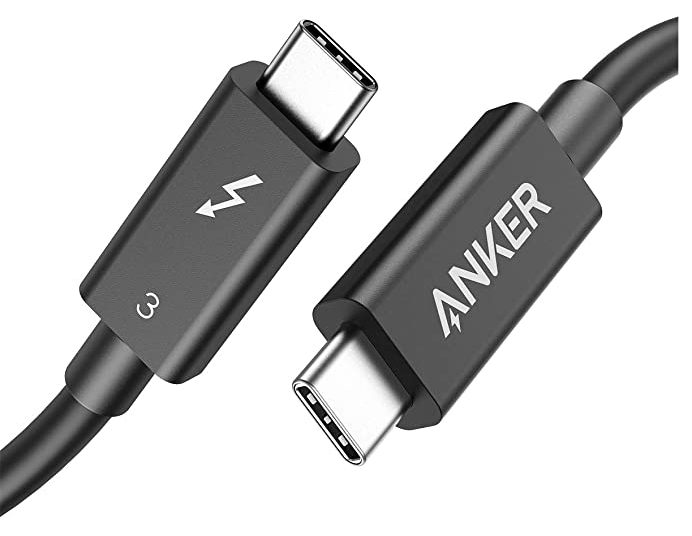
Thunderbolt 3 typically has the lighting symbol. But the best way to tell the difference is by reading the device's documentation, product description, and packaging. Since not every cable has a lighting symbol, this is Thunderbolt 3.
Which connector is the best?
It depends on what you need. Thunderbolt 3 is generally compatible with USB C, but not every USB C is compatible with Thunderbolt 3.
Thunderbolt 3 is technically the better choice if you only care about the higher data transfer rates. However, Thunderbolt 3 devices and cables are usually more expensive than their USB-C counterparts.
If you don't transfer data from external hard drives regularly, Thunderbolt 3 might turn out to be an unnecessary expense. USB-C cables can charge your devices just as well.
If you have any other questions, please get in touch with us for help.


