How to Recharge Anker 525 Power Bank (PowerCore 20K)

This power bank comes with a USB-C to USB-C cable and a USB-A to USB-C cable. See below for reference:
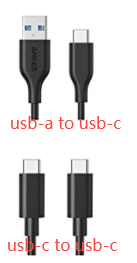
 

Recharging is done via the power bank’s USB-C port.


If you use the USB-C to USB-C cable, you will need a wall charger with a USB-C port. Using a Power Delivery wall charger, such as a Nintendo Switch charger, or an Apple 18W, 20W, 61W, or 87W charger is suggested. Using an 18W or above Power Delivery wall charger and the USB-C to USB-C cable will take around 6.5 hours to recharge the power bank.


If you use the USB-A to USB-C cable, you will need a wall charger with a USB-A port, for example, an iPad or Samsung Galaxy charger with a 5V/2A output. When using a 5V/2A wall charger and the USB-A to USB-C cable, the recharging time is around 21 hours.


If you’re still not sure how to recharge your Anker 525 Power Bank (PowerCore 20K), please contact us at support@anker.com for further assistance.

Unresolved icon
37 undefined
Which Anker power banks are allowed on a flight?
47018 views11 likes/2025-04-07 18:26:51
What is Trickle Charging Mode?
41609 views25 likes/2025-04-18 15:18:53
Power Banks’ Charging Issues
42567 views9 likes/2025-04-07 17:53:24
Anker Warranty Policy
3030 views1 likes/2025-12-29 17:30:41
How to verify the authenticity of Anker products?
3663 views1 likes/2025-12-29 17:31:54
How to Recharge Anker 525 Power Bank (PowerCore 20K)
10395 views1 likes/2025-04-07 17:16:08
Warranty Claims for Quality-Related Issues
2948 views1 likes/2025-12-29 17:31:50
Contact Us
anker link

UK:
+44 (0) 1604 936 200

Mon - Sun 9AM-6PM (GMT)

anker link

Mon - Sun 9AM-6PM

Buy on the Anker Store
anker link

Fast, Free Shipping

anker link

30-Day Money-Back Guarantee

anker link

Hassle-Free Warranty

anker link

Lifetime Customer Support

Amazon American Express Apple Pay Diners Club Discover Google Pay Klarna Mastercard PayPal Shop Pay Venmo Visa