When shopping for a USB-C hub or docking station, you've almost certainly come across Thunderbolt technology. You might even already own a product that uses Thunderbolt.
But when you look at the Thunderbolt port, it just looks like a standard USB-C port.
So what's the difference? And what's the difference between Thunderbolt 3 and 4?
1. What is Thunderbolt?
Thunderbolt's original intention was to replace and combine a number of pre-existing ports. Thunderbolt can transmit video and audio, transfer files, connect to monitors, and storage devices, and it can even charge.
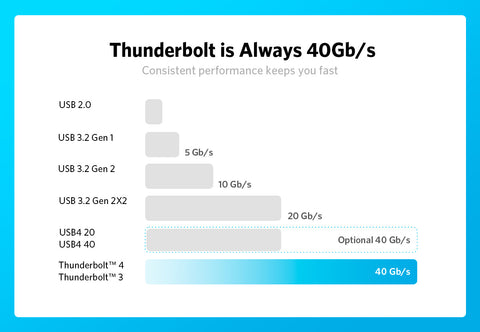
Thunderbolt technology was created back in 2010, and since then the maximum transfer speed has increased from 10 Gbps to 40 Gbps.
For more than a decade, Thunderbolt technology has been part of the Apple device ecosystem, and the USB-C port on Apple devices generally supports Thunderbolt technology. Thunderbolt technology is currently in its 4th generation and can be used on devices with Thunder Lake CPUs and Intel's EVO platform.
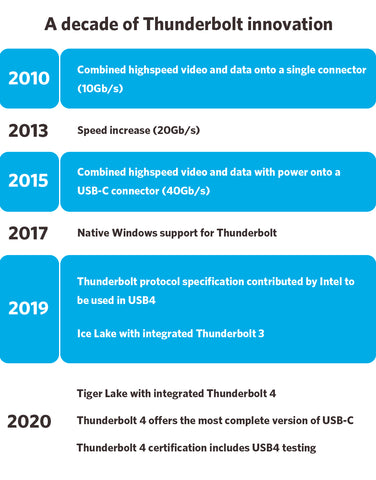
At present, Thunderbolt 3 and Thunderbolt 4 are the most commonly used versions of Thunderbolt technology.
2. What is the difference between Thunderbolt 3 and Thunderbolt 4?

- Screen Expansion: Thunderbolt 4 supports 4K to dual monitors or 8K to a single monitor, while Thunderbolt 3 supports 4K to dual monitors or 5K to a single monitor.
- Charging: Thunderbolt 4 can provide charging power up to 100W from a single port.
- Data Transfer: Thunderbolt 3 has a PCIe data transfer speed of 16 Gbps, while Thunderbolt 4 supports a PCIe data transfer speed of 32 Gbps.
- Sleep Mode: Thunderbolt 4 lets users wake up their laptop using an external keyboard or mouse that's connected via the Thunderbolt 4 port.
- Security: Thunderbolt 4 provides Direct Memory Access (DMA) protection. It is based on Intel VT-d's DMA* protection, which can physically prevent DMA attacks. Although this level of protection is probably overkilled for ordinary users, it can prevent malicious devices from using DMA to steal information from enterprises and users with extremely high data confidentiality requirements.
*DMA attack: In a Direct Memory Access attack, PCIe devices can directly access the data in a device's memory without going through the CPU. In short, if a malicious PCIe device accesses the computer, then even an encrypted computer can be easily cracked.
If you have any further questions, please contact us for assistance.


